

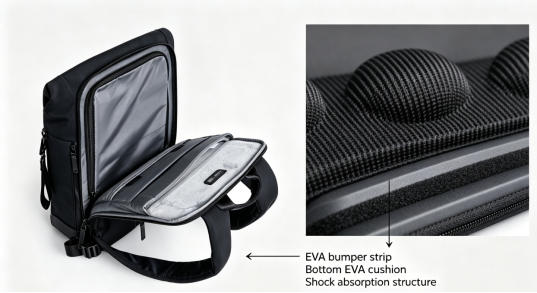
노트북 백팩 내부의 소재에는 크게 관심을 두지 않을 수 있습니다.
하지만 노트북을 백팩에 넣고 지하철에 타거나, 자전거로 통근하거나, 비행기에 탑승하거나, 실수로 백팩을 바닥에 내려놓을 때 실제로 기기를 보호하는 부분은 외부 원단이 아니라 백팩 안에 숨겨진 완충 구조입니다.
최근 몇 년 동안 점점 더 많은 노트북 백팩이 전자기기 보호층으로 EVA 폼을 사용하기 시작했습니다.
그렇다면 EVA란 정확히 무엇이며, 노트북 백팩에 적합한 이유는 무엇일까요?
더 중요한 점은, 노트북을 실제로 보호할 수 있는 백팩을 고를 때 EVA가 사용되었는지만 확인하면 되는가 하는 것입니다.
답은 그보다 복잡합니다.
잘 설계된 노트북 백팩에서 정말 중요한 것은 특정 소재 하나가 아니라 소재, 구조, 수납 구성, 휴대 시스템이 서로 조화를 이루는 방식입니다.
이는 Nayo Smart'의 백팩 설계에서도 중요한 원칙입니다. 단순히 “폼을 한 겹 추가하는 것”이 아니라 기기 보호를 전체 사용자 경험의 일부로 만드는 것입니다.
EVA 폼이란 무엇일까요?

EVA는 에틸렌-비닐 아세테이트(Ethylene-Vinyl Acetate)의 약자입니다.
EVA는 탄성, 유연성, 완충 특성으로 알려진 폴리머 소재입니다. EVA는 운동화 미드솔, 보호 장비, 전자제품 포장재, 스포츠 장비, 여행 가방 및 백팩에 널리 사용됩니다.
노트북 백팩에서 EVA는 일반적으로 폼 또는 발포 폼 패딩 형태로 사용됩니다.
핵심 기능은 간단히 다음과 같이 이해할 수 있습니다:
노트북과 외부 충격 사이에 완충층을 추가합니다.
백팩에 충격이나 압박이 가해지거나 가볍게 떨어졌을 때 EVA는 탄성과 압축 특성을 활용해 충격의 일부를 흡수하고 분산하여 노트북에 직접 전달되는 힘을 줄이는 데 도움을 줄 수 있습니다.
물론 다음과 같은 점을 기억하는 것이 중요합니다:
EVA는 “낙하에도 안전하다는 보증”이 아닙니다.
모든 유형의 낙하나 사고에서 노트북이 손상되지 않는다고 보장할 수는 없습니다.
실제 보호 수준은 EVA의 두께, 밀도, 배치, 백팩의 전반적인 구조, 노트북 수납공간의 설계, 그리고 백팩이 기기를 전체적으로 보호하는 방식과 같은 요인에도 영향을 받습니다.
노트북 백팩에 EVA가 점점 더 많이 사용되는 이유는 무엇일까요?

노트북은 현대인의 통근과 이동 중 업무에 필수적인 도구가 되었습니다.
이는 노트북 백팩이 더 이상 단 하나의 환경만을 위해 설계되지 않는다는 뜻입니다.
끊임없이 변하는 다음과 같은 상황을 감당해야 합니다:
충격, 압박, 마찰, 움직임, 일상적인 취급.
그 결과, 현대적인 노트북 백팩의 디자인 철학은 단순히 다음과 같이 묻는 것에서 점차 바뀌고 있습니다.
“노트북을 넣을 수 있나요?”
다음과 같은 질문으로
“이동하는 동안 노트북을 어떻게 보호할 수 있을까요?”
EVA는 이러한 과정에서 중요한 역할을 하기에 매우 적합합니다.
EVA는 노트북 보호에 적합한 이유가 무엇일까요?
1. 충격 완화를 위한 쿠셔닝
이는 EVA의 가장 중요한 기능 중 하나입니다.
백팩에 외부 충격이 가해졌을 때 노트북과 외피 사이에 쿠셔닝이 거의 없거나 전혀 없다면 충격이 기기에 더 직접적으로 전달될 수 있습니다.
EVA 폼은 어느 정도 압축되었다가 복원되면서 충격 에너지의 일부를 흡수하고 분산하는 데 도움을 줄 수 있습니다.
일상적인 출퇴근에서는 이러한 유형의 쿠셔닝이 특히 유용할 수 있습니다.
예를 들면 다음과 같습니다.
백팩을 바닥에 내려놓는 경우
지하철에서 누군가 실수로 부딪히는 경우
또는 카페에서 백팩 측면이 테이블 모서리에 부딪히는 경우
심각한 사고는 아닐 수 있지만, 노트북이 매일 마주할 수 있는 현실적인 상황입니다.
잘 설계된 쿠셔닝 시스템은 이러한 일상적인 위험에 대처하는 데 도움을 줍니다.
2. 단단한 물체와의 직접적인 접촉 줄이기

노트북 백팩에는 보통 컴퓨터 외에도 훨씬 많은 물품이 들어갑니다.
다음과 같은 물품도 휴대할 수 있습니다.
충전기, 마우스, 휴대용 하드 드라이브, 보조 배터리 및 기타 액세서리
모든 물건을 같은 메인 수납 공간에 넣으면 걷는 동안 물건들이 움직이며 서로 부딪힐 수 있습니다.
따라서 제대로 설계된 노트북 백팩은 단순히 폼을 더 많이 넣어서는 안 됩니다. 대신 다음 요소를 결합해야 합니다.
쿠셔닝 소재 + 전용 노트북 수납 공간 + 세심한 정리
기기가 불필요한 충격에 노출될 가능성을 줄이는 데 도움을 주기 위해
이 때문에 “노트북 백팩에 포켓이 몇 개 있나요?”라는 질문이 반드시 가장 중요한 것은 아닙니다.
더 중요한 질문은 다음과 같습니다.
“각 수납 공간에는 명확한 용도가 있을까요?”
3. 구조적 지지 제공
EVA는 쿠셔닝만 제공하는 것이 아닙니다. 백팩이 더 안정적인 구조를 유지하도록 도울 수도 있습니다.
노트북 백팩이 완전히 부드럽고 구조적 지지대가 없다면, 기기와 소지품을 넣었을 때 쉽게 무너질 수 있습니다.
다음과 같은 문제가 발생할 수 있습니다.
노트북 수납 공간이 변형됨
내부 물품이 서로 눌림
가방 구조가 덜 안정적임
노트북을 꺼내기 더 어려워짐
EVA 구조 지지대가 적절히 통합되면 노트북 수납 공간이 더 안정적인 형태를 유지할 수 있습니다.
노트북을 자주 휴대하는 사람에게는 쉽게 간과할 수 있지만 중요한 디자인 요소입니다.
EVA는 일반 폼과 어떻게 다를까요?
소비자가 “패딩”, “폼”, “쿠셔닝”과 같은 설명을 보면 모두 같은 것을 가리킨다고 생각하기 쉽습니다.
실제로는 그렇지 않습니다.
노트북 백팩에는 다양한 유형의 완충 소재를 사용할 수 있으며, 이러한 소재는 다음과 같은 특성에서 차이를 보일 수 있습니다:
탄성, 밀도, 복원력, 압축 성능, 무게 및 내구성.
EVA는 완충성, 유연성, 무게 및 구조적 안정성 사이에서 균형이 뛰어나 가방 업계에서 큰 주목을 받아 왔습니다.
백팩에서는 이러한 균형이 특히 중요합니다.
노트북 백팩은 단순히 “가능한 한 두껍게” 만드는 것을 목표로 해서는 안 됩니다.
완충 기능을 높이기 위해 보호 소재를 점점 더 추가하면 백팩 자체도 더 무거워집니다.
그리고 매일 백팩을 메는 사람에게는:
백팩의 무게는 전반적인 사용자 경험의 일부입니다.
따라서 좋은 디자인은 보호 소재를 끝없이 추가하는 것이 아닙니다.
중요한 것은 적절한 균형을 찾는 것입니다.
더 두꺼운 EVA가 항상 노트북을 더 잘 보호할까요?
반드시 그렇지는 않습니다.
이는 노트북 백팩을 선택할 때 가장 흔한 오해 중 하나입니다.
보호는 다음처럼 단순하지 않습니다:
더 두꺼운 EVA = 더 나은 보호
실제로 노트북 백팩의 보호 성능은 시스템 전체에 달려 있습니다.
최소한 다음 다섯 가지 요소를 고려할 만합니다:
① 완충 소재
백팩에 적절한 완충 특성을 지닌 소재가 사용되었나요?
② 완충재 배치
보호 소재가 실제로 노트북에 충격이 가해질 가능성이 가장 높은 위치에 배치되어 있나요?
③ 전용 노트북 수납공간
노트북이 다른 소지품과 적절히 분리되어 있나요?
④ 백팩 구조
백팩이 안정적인 형태를 유지하고 불필요한 압박을 방지하나요?
⑤ 휴대 시스템
걸을 때 백팩이 몸에 안정적으로 밀착되어 불필요한 움직임을 최소화하나요?
따라서 노트북 백팩을 선택할 때는 다음과 같이 질문하는 것이 더 유용합니다:
“이 백팩은 노트북을 어떻게 보호할까?”
Nayo Smart: 기기 보호는 단순히 폼 한 겹을 더하는 것 이상입니다
Nayo Smart에게 노트북 백팩 디자인은 제품에 기능을 그저 더 많이 쌓아 올리는 것이 아닙니다.
저희의 디자인 철학은 다음에 더 가깝습니다:
일상적인 이동에서 불필요한 마찰을 줄이세요.

이동 중에도 백팩이 노트북, 전자기기, 서류 및 일상 필수품을 정리된 상태로 보관하면서, 편안하게 메고 쉽게 꺼낼 수 있도록 하려면 어떻게 해야 할까요?
그래서 Nayo Smart는 완성도 높은 시스템에 집중합니다:
보호 × 정리 × 휴대성
다시 말해:
보호 × 정리 × 편안함
H1: 기술을 중심으로 설계된 노트북 백팩
일상적으로 노트북, 태블릿 및 기타 디지털 기기를 휴대한다면, Nayo Smart H1 은 이러한 필요를 고려해 설계되었습니다.
단순히 수납 용량을 극대화하는 데만 초점을 맞추는 것은 아닙니다.
대신 다양한 기능별 구역을 사용해 더 명확한 정리 시스템을 만듭니다.
예를 들면 다음과 같습니다.
전용 테크 수납공간은 노트북과 기타 기기를 다른 소지품과 분리해 보관하는 데 도움이 됩니다.
메인 수납공간은 의류, 서류 또는 일상적으로 사용하는 큰 물건을 넣을 수 있는 공간을 제공합니다.
전면 퀵 액세스 공간은 자주 꺼내야 하는 작은 필수품을 보관하기에 적합합니다.
전용 측면 포켓은 물병, 우산 또는 이와 비슷한 물건을 넣는 데 사용할 수 있습니다.
숨겨진 수납공간은 중요한 개인 소지품을 보다 눈에 띄지 않게 보관할 수 있는 공간을 제공합니다.
이 디자인의 철학은 간단합니다.
가방 하나에 더 많은 물건을 넣는 것이 아닙니다. 모든 물건에 각자의 자리를 마련하는 것입니다.
업무 중 노트북을 자주 휴대하고 여러 장소를 오가는 사람에게는 단순히 수납 용량을 늘리는 것보다 이것이 더 유용할 수 있습니다.
노트북 백팩에는 흔히 간과되는 또 다른 측면이 있습니다.
백팩을 얼마나 자주 열어야 하나요?
하루 종일 이어버드, 충전기, 지갑, 휴대폰 또는 기타 필수품을 자주 꺼내야 한다면 백팩이 열리는 방식이 전체적인 사용 경험에 큰 영향을 미칠 수 있습니다.
Fidlock 마그네틱 퀵 릴리스 버클을 사용하면 한 손으로 더 빠르고 편리하게 열고 닫을 수 있습니다.
L자형 와이드 오프닝과 결합되어 내부를 한눈에 더 쉽게 보고 접근할 수 있습니다.
빠른 분리. 빠른 접근. 빠른 찾기.
불필요한 검색을 한 번 줄이는 것은 결국 불필요한 방해를 한 번 줄이는 것입니다.
이것이 바로 Nayo Smart가 “Smart”라는 개념을 이해하는 방식이기도 합니다.
더 복잡한 기능을 추가하는 것이 아니라, 일상적인 이동을 더욱 원활하게 만드는 것입니다.
실제로 기기를 보호하는 노트북 백팩을 선택하는 방법
1. 전용 노트북 수납공간 확인하기
전용 수납공간은 노트북을 다른 소지품과 분리하고 불필요한 접촉을 줄이는 데 도움이 됩니다.
2. 두께뿐 아니라 완충 소재 살펴보기
두꺼운 패딩이 항상 더 나은 보호 기능을 제공한다고 생각하지 마세요. 소재 선택, 밀도, 구조, 배치가 모두 중요합니다.
3. 노트북 수납공간의 바닥과 모서리 확인하기
배낭을 바닥에 내려놓을 때 직접적인 충격을 받을 수 있으므로 이러한 부분은 특히 중요할 수 있습니다.
4. 내부 정리 상태 평가하기
정리 상태가 좋으면 충전기나 보조 배터리처럼 단단한 물건이 노트북 주변에서 자유롭게 움직이는 것을 방지하는 데 도움이 됩니다.
공유:
메신저백은 어디에서 시작되었을까? 클래식한 도심 가방의 100년에 걸친 진화
230g 초경량 슬링백, 구매할 가치가 있을까? UL5 어반 EDC 가방 완벽 리뷰